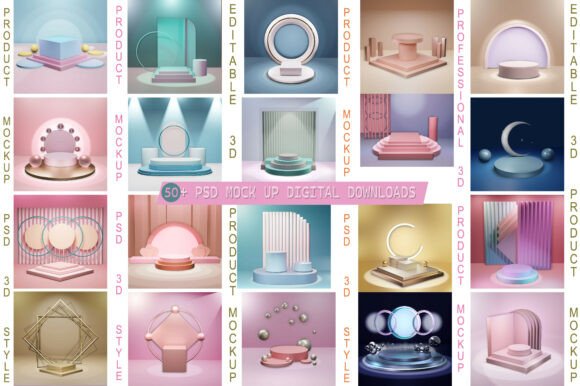
Mastering the Editable 3D Product Psd Mockup for Professional Results
In the competitive world of visual marketing, the difference between a product that sells and one that gets overlooked often comes down to presentation. A flat, two-dimensional image rarely captures the depth, texture, or realism needed to convince a customer. This is where an Editable 3D Product Psd Mockup becomes an indispensable tool. It bridges the gap between a digital design file and a tangible, photorealistic representation, allowing you to showcase your work in a context that feels authentic without needing a physical prototype.
Whether you are a freelance designer building a portfolio, a small business owner launching a new line on an online store, or a marketer creating social media assets, the ability to present your designs realistically is crucial. These mockups leverage Smart Objects within Adobe Photoshop to let you insert your artwork instantly, seeing it rendered with accurate lighting, shadows, and perspective. However, simply downloading a file does not guarantee success. Many users make avoidable mistakes that compromise the quality of their final output, leading to wasted time and unprofessional results.
The Reality Behind the "No 3D Knowledge" Promise
One of the most attractive features of this resource is the claim that no 3D knowledge is required. While technically true, there is a common misunderstanding here that can trip up even experienced designers. The assumption is that because the file uses Smart Objects, the result will always look perfect regardless of what you put inside. In reality, the quality of your input directly dictates the quality of the output.
If you place a low-resolution logo or a design with poor contrast into a high-fidelity 3D environment, the result will look muddy and unpolished. The mockup provides the stage, but your design must be the star. A frequent error is dragging and dropping a rasterized image that has already been compressed or resized multiple times. When you scale this up to fit the Smart Object layer, pixelation occurs, destroying the realistic 3D appearance the file is designed to create.
To avoid this, always ensure your source files are vector-based or high-resolution raster images before inserting them. If you are working on packaging, check that your dielines align correctly with the curvature of the mockup. Even though the file is fully layered and well-organized, neglecting the resolution of your source art undermines the entire purpose of using a professional-grade tool.
Navigating Lighting and Texture Consistency
Another area where users often stumble is ignoring the environmental context of the mockup. An Editable 3D Product Psd Mockup is crafted with specific lighting conditions, reflections, and surface textures in mind. Placing a design that clashes with these elements can break the illusion of realism.
For example, if the mockup depicts a glossy, metallic finish with strong specular highlights, placing a matte, flat-color design might look out of place unless adjusted correctly. Conversely, putting a highly textured pattern onto a smooth, glass-like surface without considering how light interacts with that texture can make the product look like a cheap sticker rather than an integrated part of the object.
The solution lies in taking a moment to analyze the base layers before you begin editing. Look at the blend modes used in the Smart Object. Some advanced mockups allow you to adjust the color balance or hue/saturation of the background to match your brand palette. Utilizing these editable colors and backgrounds ensures that your product doesn't just sit on top of the scene but feels like it belongs there. Always preview your changes at 100% zoom to catch any subtle inconsistencies in how the light hits your design versus the rest of the object.
Common Pitfalls in File Management and Organization
Efficiency is a major reason professionals choose these PSD files, yet disorganization remains a significant hurdle. The file included is described as fully layered and well-organized, which is excellent news. However, many users rush through the process, skipping the step of understanding the layer structure.
A common mistake is accidentally merging layers or flattening the image too early in the workflow. Once you flatten a Smart Object, you lose the ability to edit the content non-destructively. If you realize later that the color needs tweaking or the angle of the text needs adjustment, you are forced to start over from scratch. This inefficiency can be costly when managing multiple products or variations for a marketing campaign.
Before you export your final image, double-check that your Smart Object layers remain intact. Save your working file as a separate version from the original template to preserve the clean state of the master file. This habit ensures that you can reuse the same Editable 3D Product Psd Mockup for future projects without hunting for the original download link or dealing with corrupted layers.
Evaluating Suitability for Your Specific Needs
Not every mockup fits every project. While this specific file is suitable for print preview, digital design, and online store displays, it is vital to evaluate its specific characteristics against your intended use case. For instance, if you are planning a large-format print advertisement, you need to verify the resolution of the final exported image. High-resolution PSD files are great, but if the canvas size is too small, upscaling it for a billboard or a large poster will result in blurriness.
Additionally, consider the background versatility. Some mockups come with fixed backgrounds that are difficult to remove without leaving artifacts. This particular resource offers an editable background, which is a significant advantage for social media posts where you might want to change the setting to match a seasonal theme. However, if your primary goal is a transparent PNG for an e-commerce grid, you should test the background removal process first to ensure it yields clean edges.
When comparing different options, do not just look at the thumbnail. Download the file (if available as a preview) or examine the documentation closely to see if the Smart Objects support transparency and if the layer organization allows for easy customization of materials. A mockup that looks great in a screenshot might lack the necessary flexibility for your specific branding requirements.
Maximizing Value for Designers and Marketers
Ultimately, the goal of using an Editable 3D Product Psd Mockup is to communicate value quickly and effectively. For entrepreneurs and freelancers, time is money. Spending hours trying to manually paint shadows or simulate 3D effects in Photoshop is inefficient when a smart-object-based solution exists. By mastering the correct usage of these tools, you elevate your professional standing and save valuable resources.
Remember that the best results come from a combination of a high-quality template and careful attention to detail. Check your resolutions, respect the lighting environment, keep your layers organized, and always preview your work critically. By avoiding the common traps of low-res inputs and hasty exports, you ensure that your product presentation is as compelling as the product itself. Whether you are showcasing a new bottle design, a tech gadget, or a book cover, a realistic, modern, and clean presentation can be the deciding factor for your audience.